
123FormBuilder Knowledge Base
Search our documentation platform for answers, service specifications and 3rd-party integrations.
Fixing Form Submissions CSV Export in Microsoft Excel
There have been some problems reported when trying to open exported CSV files in Microsoft Excel. The submissions wouldn’t appear as tabular textual data. This is due to the fact that Excel sometimes can’t directly transform all data accordingly from the exported file. Follow the steps below on how to open a CSV file in Microsoft Excel:
1. In Excel click on New and create a Blank workbook.
2. Next, go to Data → Get External Data → From text.
3. Import the CSV file from your computer.
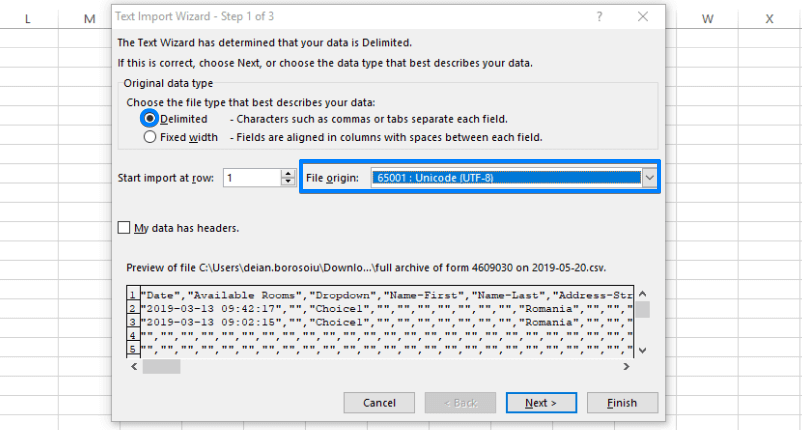
4. Check Delimited and, at File Origin, select 65001:Unicode (UTF-8) from the dropdown list.
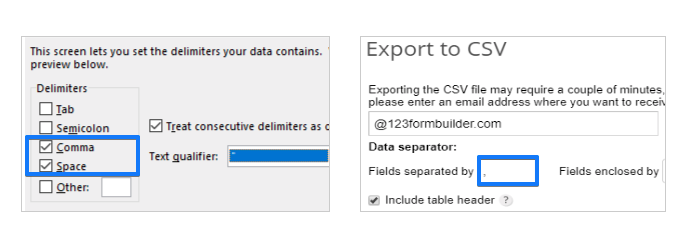
5. Click Next and, at Delimiters, choose the delimiter (field separator), be it space or comma. You’ll see the changes in the window below, within the wizard panel. The delimiter that you choose should be the same as the one you selected when exporting the CSV file from your 123FormBuilder account (Data Separator).
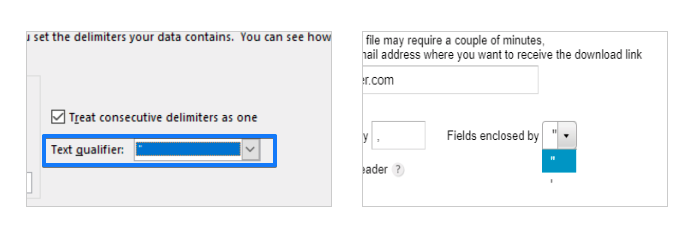
6. In the same panel choose the enclosure of the fields in Text qualifier. The qualifier that you choose should be the same as the one you selected when exporting the CSV file from your 123FormBuilder account. Hit Next, then Finish.
7. Hit Ok and you’re done. Your submissions should now be organized within a table with well-structured columns in your Excel window.
If this doesn’t work, select New worksheet before pressing Ok, instead of leaving it on Existing worksheet. Don’t forget to save your workbook.
Related articles
1 comment
Leave a Reply
Similar Articles
Frequently Asked Questions
Here is a list of the most frequently asked questions. For more FAQs, please browse through the FAQs page.
This helped me SO, SO much, Thank you!!!!