
123FormBuilder Knowledge Base
Search our documentation platform for answers, service specifications and 3rd-party integrations.
123FormBuilder Web Form Security: Captcha, IP limitation, and more
You can protect your forms in various ways using our form builder: through Captcha images, IP blocking, country filter, or even password protection. No matter where you choose to publish your online form, we offer you a variety of options to secure it from external threats. Limit your submissions by IP or country or add a password to your form to keep spammers at a distance. To make sure that no robots will submit your form, add a verification number (Smart Captcha).
Go to the Security tab, on the left, to set the security measures you want for your web form. It’s simple as that!
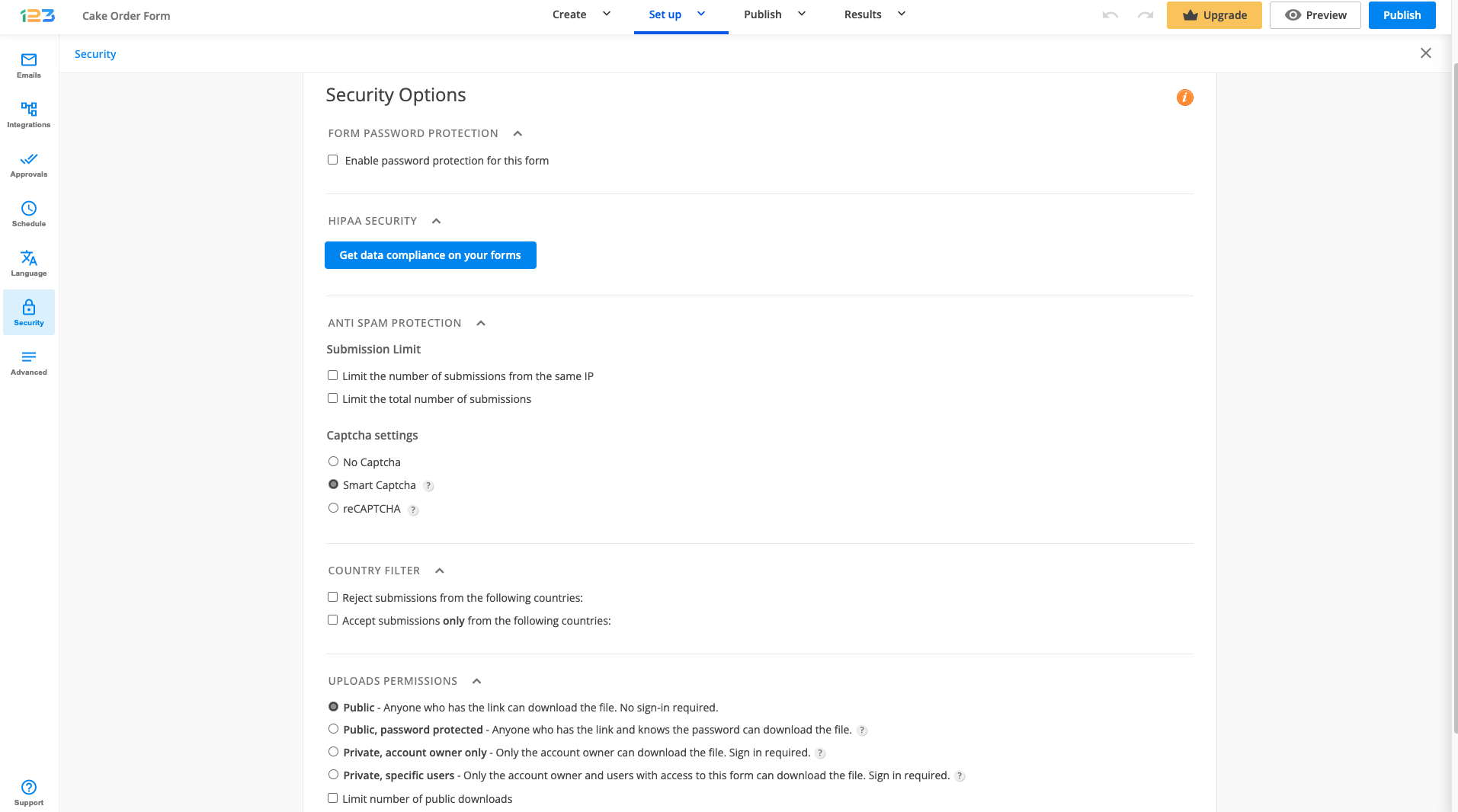
However, this is not all we deal with regarding your safety. See our page about how we handle form security for additional information or our blog article: 5 Ways to Build a Secure Web Form for Your Website
26 comments
Leave a Reply
Similar Articles
Frequently Asked Questions
Here is a list of the most frequently asked questions. For more FAQs, please browse through the FAQs page.
How can I block SPECIFIC IP addresses? (I don’t want to limit submissions from everyone, just IP addresses that are known problems.)
I am afraid that we can not block specific IP addresses. If you know their email addresses you can limit their submission based on that. More details you can find here
how do i disable a form…one of my forms is past the deadline date..i would like to stop any applications from being filled out
Hello Guy,
You can disable your form from the My Forms section by selecting the Deactivate option, under Show More.
For any further assistance please contact our Support Team at support@123formbuilder.com.
Thanks!
Is the stored data encrypted?
Hi Debra!
You have the option to encrypt all submissions, the option is found in the My Account section.
I am a gold member. Your info page says the forms are protected with the HTTPS when on the form. I don’t see it. How can I get that so my members will feel more comfortable. I am using the captcha for all forms?
It took a little while to learn the specifics, but I LOVE your forms and how they work!!!! Good job guys. John
Hello John!
In order to protect your web forms with HTTPS, you’ll need to enable the SSL encryption at Connection Type in the Publish section. But this works only for Platinum plans and above. If you want to protect your web forms through Secured Socket Layers, you’ll need to upgrade your account.
However, if your web forms are embedded on a webpage, it all depends on the security measures you have established for the respective webpage/website. In that case, as a Gold member, you can embed your web forms on a webpage with HTTPS you own.
Have a look at our Features Matrix and see what each plan has to offer.
Thanks for your kind words!
I want to remove the color from the captcha… How?
Iam putting in the numbers they say and it keeps coming up saying it isnt right thanks
verfication no always coming wrong but am typying correct no
I have no understanding about cookies. Make life more easy, please.
How do you enable cookies?
What/where is a browser?
message did not go through.
I’m on your site under Jewelry and when you click on my banner someone elses site comes up.
I can’t access your website,please let me know the process.
cant put in verification code