
Free Online Survey Builder Tool
Create online questionnaires and surveys quickly, beautifully, and without coding skills using our free survey maker. Create a school survey, an employee satisfaction survey, or a team bonding activity as easily as possible.
123FormBuilder is your go-to web resource for all things surveys: it’s simple, quick, and pleasant to use, and it’s totally customizable.
Trusted by 35,000+ clients, from small businesses to large enterprises


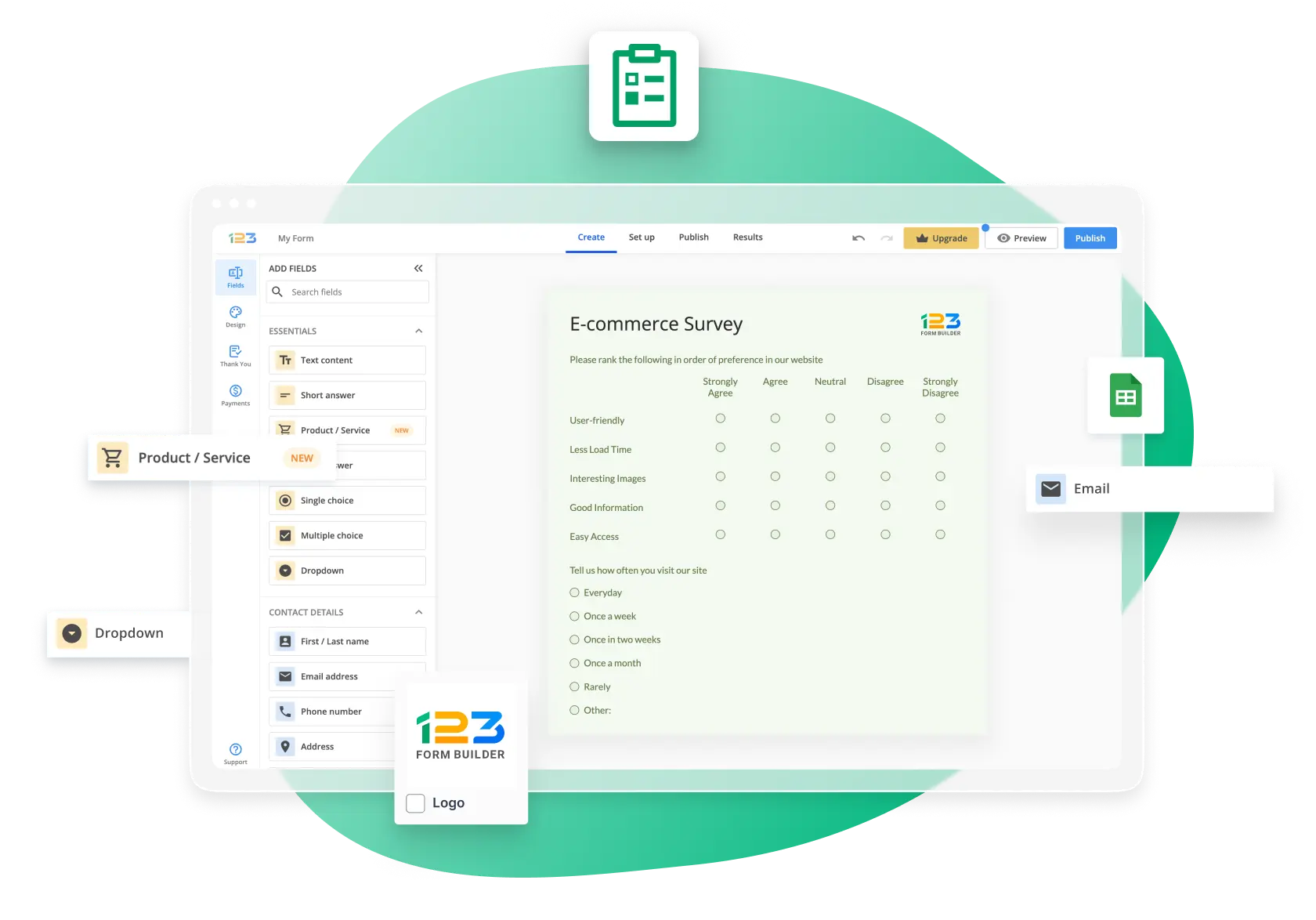
Create Engaging Online Surveys with Our Drag & Drop Editor
123FormBuilder is your online survey maker of choice! All you have to do to access our free survey templates is sign up for a free account. It’s free forever.
And if your needs change, you can easily upgrade to one of our paid plans. Unlock valuable features for creating survey forms like:
- Form design – add your brand, colors, and fonts on surveys to make the surveys truly yours
- Conditional logic – personalize the user experience by showing them questions related to their previous answers
- Likert scale – measure responder sentiments and behaviors with rating scales
- Email notifications – keep in touch with responders and nurture an active relationship
- Upload images to your online surveys to make them more engaging
- Integrate with third-party apps to store info where you need it
- Form and Field Insights – check how your forms perform, make changes, and test engagement

Smart Surveys with Question Branching and Conditional Logic
Use conditional logic to create a beautiful experience for your respondents and boost response rates.
Your survey will self-customize based on the answers provided by respondents and show only relevant questions. For example, if a respondent states that they like ice cream in a multiple-choice question, you can ask what their favorite flavor is. If they dislike it, the next question will be skipped.
Providing a personalized experience allows you to ensure a higher completion rate and collect more accurate data. With our advanced conditional logic, you can do more than just branch out questions. You can also create custom Thank You pages and trigger tailored confirmation messages to show your respondents their input is valued and appreciated. This will increase response rates and drive greater customer satisfaction.
Create Your Free Online Survey
Email Notifications for Every Need
With the 123FormBuilder online survey tool, you can enable automated email messages to reach your survey respondents. You can use these to:
- Thank respondents for taking the time to respond to your questions
- Give them a voucher to utilize as a thank you for submitting their response
- Send them an e-book or a white paper related to the survey
- Send them a copy of their responses
- Remind them of an incomplete survey (using the save and resume functionality)
- Send them the survey results once the survey is completed
- Attach a document, such as a certificate of completion from a course

Branded Online Surveys and Questionnaires
Customize your survey so that it fits your brand 100%. Start with a theme from our gallery, or design your theme from scratch without coding skills.
The 123FormBuilder survey maker has a real-time theme designer containing tens of customizable properties.
The survey designer makes it easy to personalize your surveys by adding your logo and brand elements, such as colors or fonts. Images can also be used for a greater impact. If you prefer, you can add your own CSS code or import your stylesheet.
Create Your Free Online Survey
Multi-Language Support for a Diverse Target Audience
When your target audience comprises speakers of different languages, you can serve the online survey in each language.
Respondents will select their preferred language in a picklist, and the entire survey will load in that specific language, from the survey statements and possible responses to the system messages indicating filling errors or guidelines for completion.
To obtain quality data that you can rely on, it is essential to speak the same language as your respondents – and, with the 123FormBuilder online survey creator, you can do just that quickly and easily.

Automated Reports to Make the Most Out of Your Data
The data you collect through your survey can be automatically presented in various ways, depending on your needs.
Visual charts are the easiest and friendliest way to display survey results. Our free survey builder contains pie charts, bar charts, and other widgets that allow for a quick visual representation of your data.
You can also display collected survey data in a table format with sorting and filtering options. This approach goes deeper than the highlights and provides access to the collected information.
Share reports automatically with the respondents after they have finished filling out the survey. Your data can also flow automatically in your Google spreadsheet, Excel file, or other apps that you use.
Create Your Free Online Survey
Online Survey Templates for Every Need
123FormBuilder is both simple to use and incredibly versatile. Whether you need to get rapid feedback or do more comprehensive market research, you will have all of the resources you require at your fingertips.Our extensive list of online survey templates includes:
- Customer satisfaction surveys
- Product feedback surveys
- Market research surveys
- Employee satisfaction surveys
- 360-degree feedback surveys
- Net Promoter Score surveys
And many more. All questionnaires and surveys are fully mobile-responsive, so your audience can fill them even on the go.
Discover Survey Templates
Secure Surveys, Protected Data
Conducting surveys entails a significant deal of responsibility. With 123FormBuilder, you can be confident that your personal information and other data you collect are secure.
Our online survey maker is:
- GDPR-compliant
- HIPAA-compliant
- ISO 9001-compliant
- ISO 27001-compliant
123FormBuilder runs on Amazon Web Services servers, among the most popular, secure, and reputable cloud computing solutions.
As far as spam is concerned, as a survey owner, you can enable reCAPTCHA, IP limitation, filtering by location, and other features that ensure you receive only quality data (DKIM, SPF).

Connect Your Survey to Your Favorite Apps
Streamlining your business processes is crucial to saving time and money. With our online survey builder, you can seamlessly integrate the valuable data you collect with the most popular apps you already use.
Our tool integrates directly with email marketing, customer relationship management, help desk and customer service, project management, content management, and social media apps. The most popular forms integrations include:
Plus, with Zapier integration, you gain access to 5,000+ additional apps. Why waste time manually transferring data when you can easily automate it with one of the best online survey tools on the market and focus on growing your business?
Discover Our Integrations
How to Make a Survey in 3 Steps
Create
Pick one of the free survey templates or create a survey from scratch. With our free online survey tool, both options are very easy to work with.

Customize
Customize your survey by adding the questions and statements you need with our drag-and-drop editor. Style the survey with your brand elements.
Publish
Publish the survey anywhere online: on your website, on your social media channels, or by simply sharing your link with respondents.