
123FormBuilder Knowledge Base
Search our documentation platform for answers, service specifications and 3rd-party integrations.
The 123FormBuilder Dashboard
The Dashboard is the first page you see when you log in to your 123FormBuilder user account. It includes the general status of your forms, statistics, system messages, and potential problems. Monitor the activity of your account, especially when submissions keep rolling in.
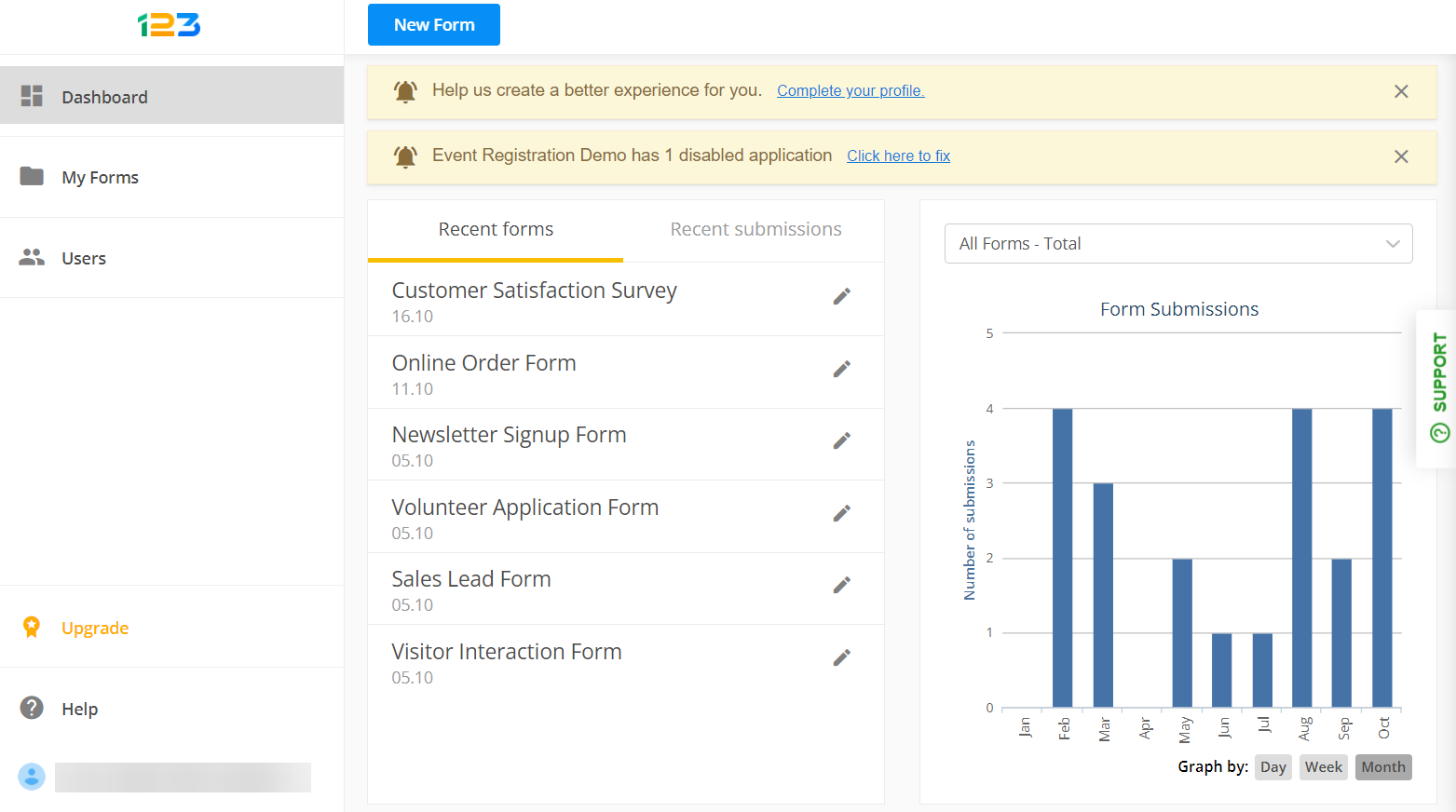
Here you have instant access to the latest forms created or edited, as well as the latest forms that have received new submissions. You can easily start creating new forms by selecting the New Form button.
From the My Forms tab on the left side, you can view all the existing forms in your account. View, manage, or create sub-users by accessing the Users tab.
Furthermore, if you need to upgrade your 123FormBuilder account, click on Upgrade and choose one of our available subscriptions.
If you need any assistance with your forms, or just want to check what 123FormBuilder has to offer, select the Help button to contact our Customer Care team or access our Knowledge Base articles.
Lastly, by selecting your username from the bottom left corner of the dashboard, you have access to your Account Details, API keys, and much more.
Related articles
Similar Articles
Frequently Asked Questions
Here is a list of the most frequently asked questions. For more FAQs, please browse through the FAQs page.